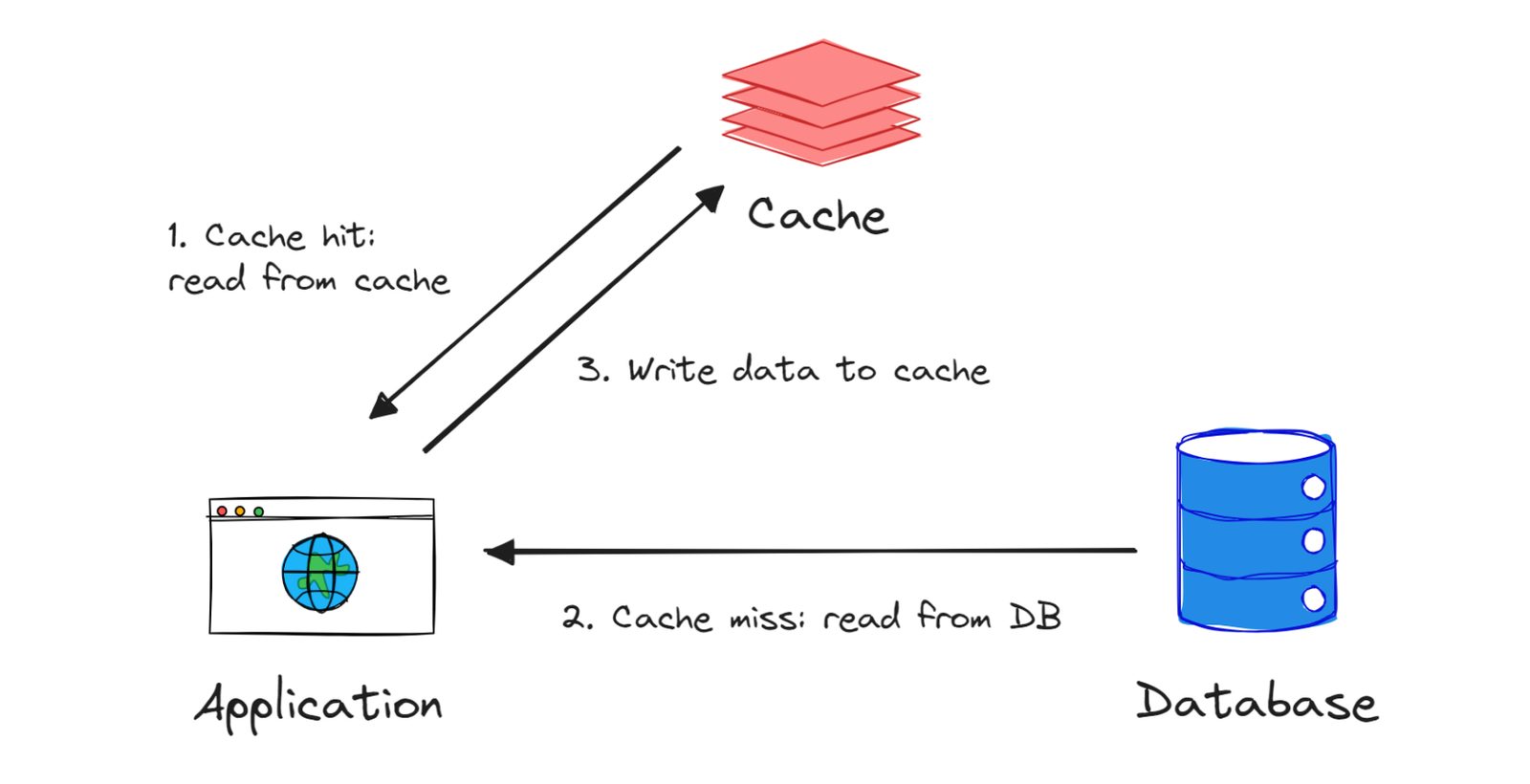
Caching Is a Spectrum: Picking the Right Strategy for Each Layer
The hard part about caching isn't the implementation. The hard part is deciding what to cache, for how long, and what happens when the cache is wrong.
I've shipped bugs in both directions: pages that never updated because cache TTLs were too long, and APIs that hammered the database because nothing was cached. The sweet spot is different for every piece of data, and there's a framework for thinking about it.
The Axes That Matter
Before picking a strategy, answer two questions about the data:
How often does it change? A user's name might change once a year. The current stock price changes every second. Cached user configuration vs. cached live market data need completely different approaches.
What is the cost of showing stale data? A user seeing slightly old analytics numbers: low cost. A user not seeing that their payment failed: high cost. A user seeing someone else's data: catastrophic.
The caching strategy follows from these two questions.
HTTP Cache-Control, Properly Used
The Cache-Control header is more expressive than most people use it. Beyond max-age, there are directives that matter:
Cache-Control: public, max-age=31536000, immutable
Use this for content-addressed assets — files where the filename includes a hash of the content (e.g., app.a3b9c2d.js). The content will never change, so cache forever. immutable tells the browser it doesn't even need to revalidate on reload.
Cache-Control: public, max-age=0, must-revalidate
Use this for HTML pages. Max-age of 0 means "always revalidate before serving from cache." This lets CDNs and browsers cache the response but they always check with the server before serving it. You get the fast path when the content hasn't changed (304 Not Modified), but you always get fresh content when it has.
Cache-Control: private, max-age=300
private means the CDN shouldn't cache this only the user's browser. Good for authenticated responses that are user-specific.
Cache-Control: no-store
Don't cache at all. Not in the browser, not in any intermediate caches. Use for genuinely sensitive data or for responses that must always be fresh (two-factor auth codes, payment confirmations).
Stale-While-Revalidate: The Sweet Spot
stale-while-revalidate is the directive I end up using most in practice:
Cache-Control: public, max-age=60, stale-while-revalidate=3600
Translation: serve from cache for 60 seconds without checking. From 60 seconds to 3600 seconds, serve the stale cached version immediately while fetching a fresh version in the background. After 3600 seconds, require a fresh fetch before serving.
This gives you fast responses even for slightly stale data, and the background revalidation keeps things fresh without making the user wait. For product listings, navigation menus, user-visible configuration — this hits the right balance.
Next.js Built-In Caching
Next.js wraps fetch with extended caching options in App Router:
typescript// Cache indefinitely (until explicitly invalidated)
const data = await fetch('/api/products', {
  next: { tags: ['products'] }
})

// Cache for 60 seconds, then revalidate in background
const data = await fetch('/api/navigation', {
  next: { revalidate: 60 }
})

// Never cache
const data = await fetch('/api/user/profile', {
  cache: 'no-store'
})
The tags option enables on-demand cache invalidation. When you update a product, invalidate the products tag:
typescriptimport { revalidateTag } from 'next/cache'

// In a Server Action or API route
async function updateProduct(id: string, data: ProductUpdate) {
  await db.product.update({ where: { id }, data })

  // Purge all cached responses tagged with 'products'
  revalidateTag('products')
}
Every page or component that fetched with next: { tags: ['products'] } gets fresh data on the next request. No need to know which specific URLs to purge.
Application-Layer Caching in Node.js
For expensive computations or database queries that you want to cache in the application process, a simple in-memory cache is often sufficient:
typescript// lib/cache.ts
interface CacheEntry<T> {
  value: T
  expiresAt: number
}

class MemoryCache {
  private store = new Map<string, CacheEntry<unknown>>()
  private cleanupInterval: NodeJS.Timeout

  constructor(cleanupIntervalMs = 60_000) {
    this.cleanupInterval = setInterval(() => this.cleanup(), cleanupIntervalMs)
  }

  set<T>(key: string, value: T, ttlMs: number): void {
    this.store.set(key, {
      value,
      expiresAt: Date.now() + ttlMs,
    })
  }

  get<T>(key: string): T | undefined {
    const entry = this.store.get(key)
    if (!entry) return undefined
    if (Date.now() > entry.expiresAt) {
      this.store.delete(key)
      return undefined
    }
    return entry.value as T
  }

  delete(key: string): void {
    this.store.delete(key)
  }

  invalidatePrefix(prefix: string): void {
    for (const key of this.store.keys()) {
      if (key.startsWith(prefix)) this.store.delete(key)
    }
  }

  private cleanup(): void {
    const now = Date.now()
    for (const [key, entry] of this.store.entries()) {
      if (now > entry.expiresAt) {
        this.store.delete(key)
      }
    }
  }
}

export const cache = new MemoryCache()
The pattern that makes this useful is the "cache-or-compute" helper:
typescriptasync function cached<T>(
  key: string,
  ttlMs: number,
  compute: () => Promise<T>
): Promise<T> {
  const cached = cache.get<T>(key)
  if (cached !== undefined) return cached

  const value = await compute()
  cache.set(key, value, ttlMs)
  return value
}

// Usage
const config = await cached(
  'app:config',
  5 * 60 * 1000, // 5 minutes
  () => db.config.findMany()
)

const userPerms = await cached(
  `user:${userId}:permissions`,
  60 * 1000, // 1 minute
  () => computeUserPermissions(userId)
)
The Thundering Herd Problem
When a cache entry expires and multiple requests come in simultaneously before the cache is repopulated, all of them hit the underlying data source at once. For expensive operations, this can bring down a database.
The fix is a per-key mutex:
typescriptconst inflight = new Map<string, Promise<unknown>>()

async function cachedWithDedup<T>(
  key: string,
  ttlMs: number,
  compute: () => Promise<T>
): Promise<T> {
  const cached = cache.get<T>(key)
  if (cached !== undefined) return cached

  // If there's already an in-flight request for this key, wait for it
  const existing = inflight.get(key) as Promise<T> | undefined
  if (existing) return existing

  // Start of compute and register it as in-flight
  const promise = compute().then((value) => {
    cache.set(key, value, ttlMs)
    inflight.delete(key)
    return value
  }).catch((err) => {
    inflight.delete(key)
    throw err
  })

  inflight.set(key, promise)
  return promise
}
Now no matter how many concurrent requests come in for an expired cache key, only one compute runs. Everyone else waits for it.
Distributed Caching With Redis
In-memory cache doesn't survive process restarts and isn't shared across multiple server instances. For shared caches, use Redis:
typescript// lib/redis-cache.ts
import { redis } from './redis'

export async function rget<T>(key: string): Promise<T | null> {
  const value = await redis.get(key)
  if (!value) return null
  return JSON.parse(value) as T
}

export async function rset<T>(key: string, value: T, ttlSeconds: number): Promise<void> {
  await redis.set(key, JSON.stringify(value), { EX: ttlSeconds })
}

export async function rcache<T>(
  key: string,
  ttlSeconds: number,
  compute: () => Promise<T>
): Promise<T> {
  const cached = await rget<T>(key)
  if (cached !== null) return cached

  const value = await compute()
  await rset(key, value, ttlSeconds)
  return value
}
For most apps, a two-layer cache — in-memory for ultra-hot data with a short TTL, Redis for shared data with longer TTLs — covers almost everything.
The Cache Invalidation Rule
There's a reason it's famously hard problem: invalidating a cache correctly requires knowing all the places a piece of data is cached, and all the things that could change it.
The approach that scales: name your cache keys to include the data they depend on, and invalidate by prefix.
user:123:profile        → invalidate when user 123 updates profile
user:123:permissions    → invalidate when user 123's roles change
org:456:members         → invalidate when org 456 membership changes
When user 123 does anything: cache.invalidatePrefix('user:123:'). You don't have to enumerate every key.
This is more disciplined than it sounds at first. The discipline pays off the first time you change a data model and your caches stay coherent.
This is more disciplined than it sounds at first. The discipline pays off the first time you change a data model and your caches stay coherent.